
You've landed at JFK — or LAX, or O'Hare — and within five minutes you need a map, a hotel confirmation, and possibly a way to tell someone back home that the flight wasn't as turbulent as expected. The United States is a vast, modern country, and its internet infrastructure mostly lives up to that image, but 'mostly' is doing a lot of work in that sentence. Without a plan for connectivity, you can find yourself in situations that range from mildly inconvenient (no Google Maps in a rental car) to genuinely stressful (can't reach your accommodation because you have no data). Knowing your options for getting internet in the USA before you touch down is one of the most practical things you can do for any trip — and it doesn't have to be complicated.
How Good Is the Internet in the USA?

The short answer: very good, in most places you'll visit. According to the Speedtest Global Index, the USA consistently ranks among the top 15 countries globally for mobile internet speeds, with average 4G/LTE download speeds regularly exceeding 80 Mbps and 5G coverage expanding rapidly in major cities. If you're spending your trip in New York, Los Angeles, Chicago, Miami, or Las Vegas, you will almost certainly have fast, reliable mobile coverage everywhere from your hotel room to a food truck on the corner.
The longer answer involves geography. Once you leave dense urban areas, coverage becomes patchier. National parks like the Grand Canyon, Yellowstone, or Zion have famously limited (sometimes zero) mobile signal in their interiors. Long road trips through Montana, Wyoming, or parts of Texas can involve stretches of highway where data simply doesn't exist. Rural America is genuinely rural. This is worth knowing in advance — not to alarm you, but so you download your maps and boarding passes while you still have signal.
1. Which Local Carrier Is the Fastest?
Not all networks are created equal in the USA, and the one you use will shape your experience. Here's a side-by-side comparison of the three main national carriers:
Provider | Network Type | Coverage % | Avg. Speed | Tourist Destinations | Best For |
T-Mobile | 4G LTE / 5G | ~99% pop. | ~90 Mbps | NYC, LA, Chicago, Vegas, Seattle | City travelers; best 5G in urban cores |
AT&T | 4G LTE / 5G | ~97% pop. | ~85 Mbps | NYC, Miami, LA, Nashville, national parks | Balanced coverage; strong along highways |
Verizon | 4G LTE / 5G | ~98% pop. | ~88 Mbps | East Coast, rural zones, national parks | Rural trips, road trips, parks exploration |
Traveler's tip: For most tourists sticking to cities and major tourist routes, any of the three carriers will serve you well. If your trip includes national parks, coastal drives, or rural destinations, AT&T and Verizon tend to outperform T-Mobile in non-urban coverage — which is worth knowing, because Teclapi's USA eSIM runs on both the AT&T and Verizon networks, giving you automatic switching between the two for the broadest possible coverage without any manual effort on your part.
2. Free WiFi in the USA: What Should I Actually Expect?
Public WiFi exists across the USA and can be useful for low-stakes tasks when you don't want to use mobile data. Here's an honest picture:
Hotels: Most offer WiFi, though quality varies widely — fine for emails at a budget motel, impressive at a business hotel.
Coffee chains and cafes: Starbucks, Dunkin', and most independent cafes offer free WiFi, usually without any complicated login.
Airports: Nearly all major US airports provide free WiFi, though speeds in crowded terminals can be slow.
Transit: Some metro systems (notably New York City's subway) now offer WiFi at stations, but coverage on moving trains is inconsistent.
Shopping malls and restaurants: Often available but not always prominently advertised.
The main caveat for international travelers: unlike some countries, US public WiFi networks do not require SMS verification to log in — so you won't be locked out for lacking a local phone number. That said, public networks are not private. Avoid logging into banking apps or sending sensitive information over open WiFi without a VPN. Some travel eSIM providers include a built-in VPN in their packages, which solves this concern neatly. If you plan to rely heavily on public WiFi rather than a data plan, do use a VPN and be prepared for speeds to be inconsistent.
What Are the Best Ways to Get Internet in the USA for Tourists?
The USA has no shortage of ways to get online, but not all of them suit a short-term international visitor. Queuing at an airport kiosk with jet lag is nobody's idea of a good start to a holiday. Here is a clear comparison of your four main options, so you can choose the one that matches how you travel:
Option | Setup | Price | Data Speed | Convenience | Hotspot | Best For |
International Roaming | None (auto) | $10–30/day | Varies (often throttled) | ★★★★★ | Often ✓ | Short trips, anyone who hates setup |
Local SIM Card | Buy at airport / store | $30–60 (7 days) | Full 4G/5G | ★★★ | ✓ | Budget travelers staying 1+ weeks |
Pocket WiFi | Pre-order & pick up | $8–15/day | 4G LTE shared | ★★ | ✓ (up to 5 devices) | Groups; travelers with multiple devices |
Travel eSIM | App install before departure | From $1.85 | Full 4G/5G | ★★★★★ | ✓ | Most travelers — flexible, affordable, instant |
Each of these options works — the right one depends on your trip length, budget, and tolerance for setup. International roaming is effortless but expensive over more than a day or two. Local SIM cards offer great value but require finding a store and surrendering your home number temporarily. Pocket WiFi devices are excellent for groups but add a physical gadget to manage and charge. Choosing a best USA travel eSIMs have quietly become the default choice for most international travelers: you set everything up before you leave home, your original SIM stays active for calls and two-factor authentication, and prices have dropped to the point where they compete easily with local SIM options.
Choosing the right eSIM: Look for one that runs on major US networks (AT&T or Verizon for widest coverage), offers clear data tiers, and lets you top up if you run low. Unlimited plans sound appealing but often come with speed limits after a daily threshold — read the fine print before buying.
Is the Teclapi eSIM USA Worth It for My Trip?
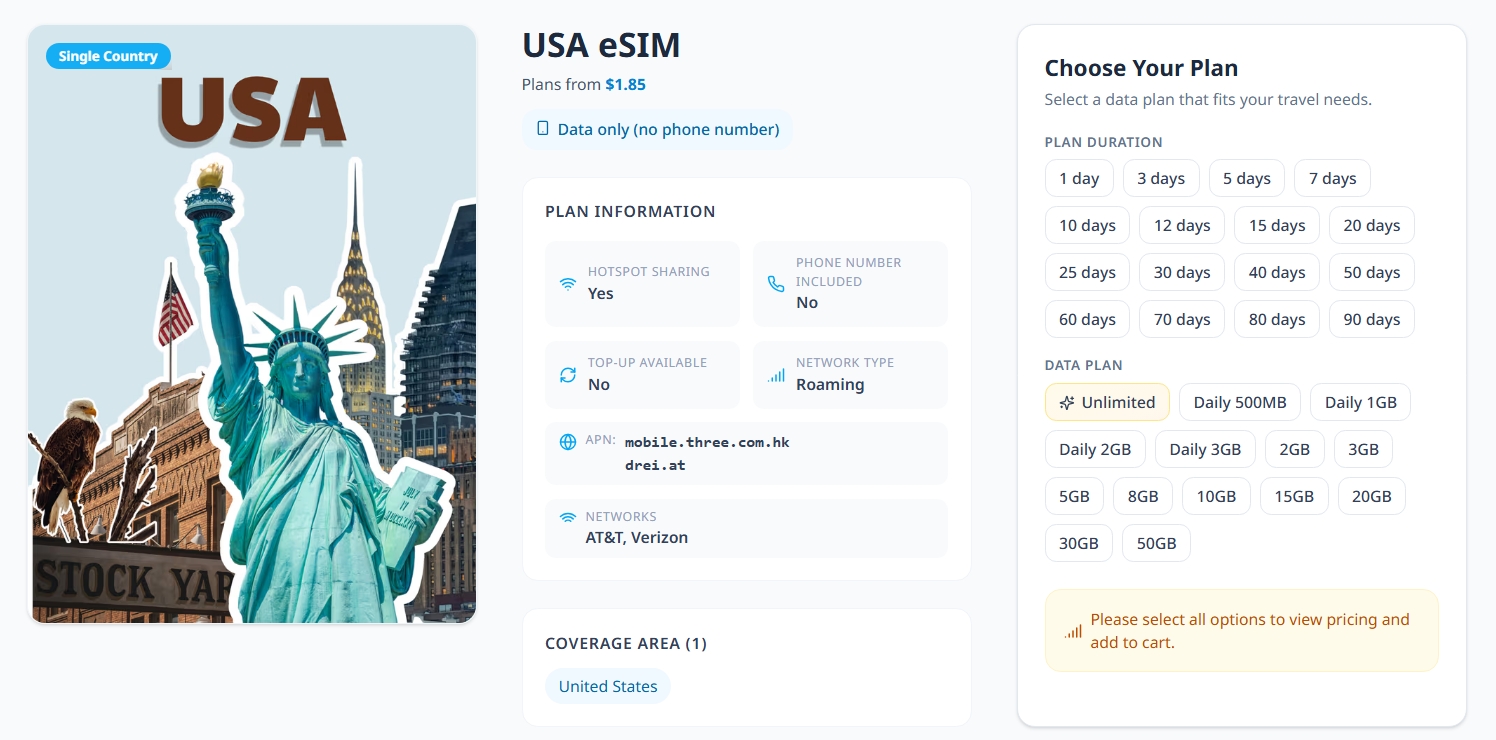
Here's a scenario worth imagining: you arrive at LAX after a 14-hour flight, find the SIM card kiosk, and discover there's a queue of twelve people ahead of you, the staff don't speak your language, and you need to present your passport before they'll sell you anything. The whole process takes 40 minutes. An eSIM means you simply open an app, tap activate, and you're online before the plane reaches the gate.
Teclapi's USA eSIM is designed specifically for international visitors, with plans that suit trips of different lengths and budgets. A few things that make it stand out for a US trip:
- Runs on AT&T and Verizon networks: Useful for travelers moving between cities, suburbs, airports, and highways.
- Automatic network switching where supported: Your phone can connect to the available partner network without manual SIM swapping.
- Flexible plan types: Choose Daily, Total, or Unlimited data based on your itinerary and usage style.
- QR code delivery by email after payment: Install before departure while you still have stable home Wi-Fi.
- Multilingual support: Teclapi supports VI, EN, and FR, with help available via WhatsApp, Zalo, Facebook, and support email.
- Soft landing for first-time eSIM users: No physical SIM tray, no store visit, and no need to replace your home number.
Teclapi also covers a wide range of other destinations beyond the USA, which matters if your trip includes a stopover in Asia or you're building a longer multi-country itinerary. One eSIM provider for the whole journey simplifies things considerably.

How Much Data Do You Actually Need for a USA Trip?
Most travelers either over-buy out of anxiety or under-buy out of optimism. Neither is ideal: buying 20 GB when you'll use 4 is a waste of money, and running out of data on day three of a seven-day trip — when you're navigating an unfamiliar city — is genuinely stressful. The table below breaks down realistic usage by traveler type:
Traveler Type | Daily Usage | 7-Day Estimate | Suggested Plan | Teclapi Plan |
Light user (maps + messaging) | ~200–400 MB | ~1.5–3 GB | 3 GB total | 3 GB / 15 days |
Average traveler (social + browsing) | ~500–800 MB | ~3.5–6 GB | 5–6 GB total | 5 GB / 30 days |
Heavy user (video calls + streaming) | ~1–2 GB | ~7–14 GB | 10–15 GB total | 10 GB / 30 days |
Digital nomad (remote work + video) | ~3–5 GB+ | ~20 GB+ | Unlimited daily | Unlimited plans |
To put those numbers in more relatable terms: streaming one hour of YouTube at standard quality uses roughly 700 MB; a 30-minute video call consumes about 400–600 MB; an hour of music on Spotify uses around 100 MB; and uploading or browsing Instagram for 30 minutes chews through approximately 150–200 MB. Google Maps in navigation mode is surprisingly light at around 5 MB per hour, though downloading offline maps (which you should absolutely do before heading to national parks or rural areas) takes a one-time chunk of 200–500 MB per map region.
Once you know your rough daily usage, matching it to a Teclapi plan is straightforward — the option to choose between daily-cap plans, fixed-total plans, and unlimited-speed plans means you're not forced into a one-size-fits-all package.
Practical Tips for Staying Connected During Your USA Trip

Getting a data plan sorted is step one. Making the most of it over the course of your trip is step two. These tips are drawn from the realities of traveling specifically in the United States:
Download offline maps before you leave cities. Google Maps and Maps.me both allow offline downloads. Signal in US national parks is unreliable, and some rural Interstate stretches have no coverage for 30–60 miles. Download the regions you're visiting while you still have strong WiFi.
Keep your home SIM active alongside your eSIM. Many two-factor authentication codes, banking apps, and WhatsApp accounts are tied to your home number. With eSIM, your original SIM stays in your phone — you get mobile data through the eSIM while calls and verification codes still come through on your regular number.
Set your phone's cellular data setting to use the eSIM only. On most smartphones, you can assign eSIM to 'mobile data' and keep your home SIM for voice. This prevents accidental international roaming charges appearing on your home bill.
Avoid peak-hours at free WiFi spots. Airport WiFi before a morning flight and hotel WiFi at 9 PM can both be painfully slow due to congestion. Use your mobile data for anything time-sensitive and save the WiFi for low-priority downloads.
Turn off automatic iCloud or Google Photos backup over mobile data. A day of sightseeing photos can quietly consume 1–2 GB if your phone starts syncing in the background. Set backups to WiFi only before you travel.
In the USA, 911 is the emergency number — and it works even without a data plan or active SIM. This is worth knowing but hopefully never relevant.
Seasonal note: If you're traveling between June and August, network congestion in tourist-heavy areas (like Times Square on a summer weekend, or Yellowstone in peak season) can noticeably slow speeds. Teclapi's AT&T/Verizon network switching helps here, as the two networks don't always congest simultaneously in the same locations.
Final Thoughts: Getting Connected Before You Land
The USA is a country that rewards having a plan — and that applies to your connectivity as much as your itinerary. The infrastructure is genuinely excellent in cities and well-traveled tourist routes. The gaps, when they exist (rural stretches, deep park interiors), are predictable enough to prepare for. Knowing your options means you can make a straightforward decision rather than an expensive or inconvenient one at the airport.
If you're planning a US trip and want data coverage that works across both the AT&T and Verizon networks — from Manhattan to Monument Valley — Teclapi's USA eSIM plans are worth a look.